Twitter Automated: Build a 30+ Tweet Weekly Workflow in 2026
Twitter automated workflows combine scheduling, AI drafting, and analytics; complete 2026 guide on what X allows, the four-layer stack, and a 90-minute weekly plan.

Manually composing 17 tweets per week (the 2026 platform average) means 17 separate context switches, 17 chances to forget, and 17 missed peak engagement windows. The solution is going Twitter automated: build a workflow where you batch-write, schedule, monitor, and respond with system-level support so the daily output happens without daily effort. Done right, automation produces 5-10x the volume of manual posting with no drop in engagement quality.
This guide walks through what X automation actually means in 2026, the rules X allows (and the ones that get accounts suspended), the four-layer automation stack that top creators run, and the workflow that ships 30+ tweets per week in under 90 minutes of focused work. Automation done right is the difference between burnout-driven inconsistency and compounding presence on the platform.
What X Automation Actually Means in 2026
"Automated" covers a wide spectrum, ranging from completely allowed (scheduled posts) to completely banned (auto-DM blasts). Understanding the spectrum is the foundation for any automation workflow.
- Scheduled posting: Fully allowed. Native X scheduler + third-party tools.
- Bulk import + queueing: Allowed. Standard feature of paid scheduling tools.
- Tweet recycling: Allowed if you vary text between repeats.
- AI-assisted drafting: Allowed. AI generates drafts, human reviews and ships.
- Auto-reply with templates: Borderline. Allowed for FAQ-style customer service; not for engagement farming.
- Auto-DM new followers: Banned. Triggers automation policy violations.
- Mass follow/unfollow: Banned. Detected within hours.
- Auto-like at scale: Banned. Particularly aggressive enforcement in 2026.
According to Digital Applied's 2026 marketing report, X tightened automation policies in early 2025. Accounts that previously got away with mass engagement now face restrictions within days.
The Four-Layer Automation Stack
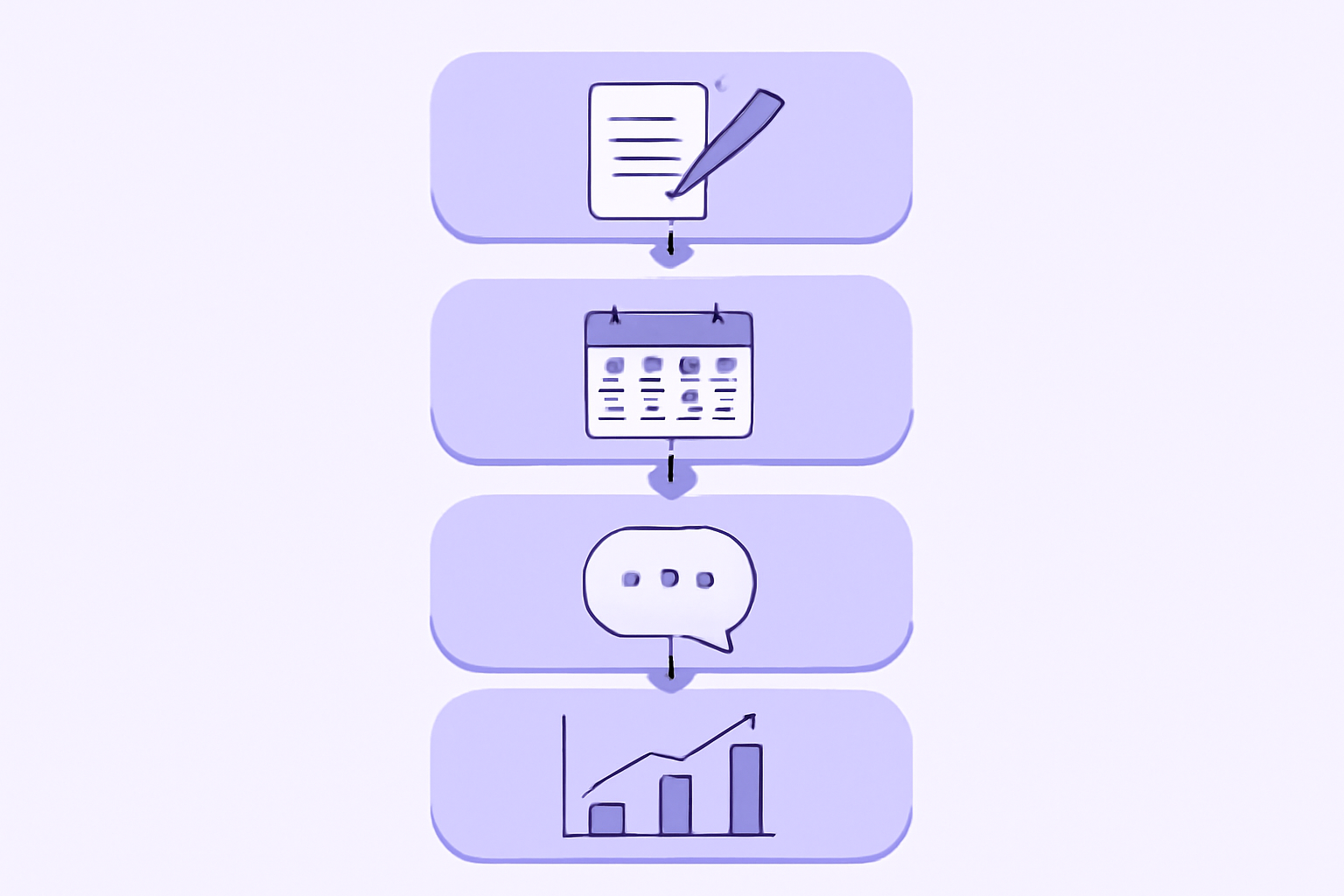
Every automated X workflow benefits from four layers, each addressing a different bottleneck.
Layer 1: Drafting Automation
AI tools generate post drafts in your voice. You review, edit, and approve. Time saved per tweet: 3-5 minutes. Tools: ChatGPT, Claude, X's native AI assistant, Hypefury AI, TweetHunter inspiration library.
Layer 2: Scheduling Automation
Drafts move into a scheduled queue. Posts publish at preset times. Time saved per tweet: 1-2 minutes (no need to be online). Tools: X native scheduler, Buffer, Hypefury, Hootsuite, Sprout Social.
Layer 3: Engagement Automation
Pre-built reply templates for FAQ-style messages, automated thread unrolling, scheduled retweets of evergreen content. Use carefully. Tools: Black Magic, TweetHunter, your own bot scripts.
Layer 4: Analytics Automation
Automated weekly reports, threshold alerts (impressions drop below X), competitor monitoring digests. Time saved per week: 2-4 hours. Tools: X Premium, Sprout Social, Brand24, our AI-powered platform.
The 90-Minute Weekly Workflow
The exact session structure most top creators run.
Minute 0-15: Inspiration Gathering
Open your top 10 sources of content ideas (saved tweets, Notion notes, industry news, competitor posts). Pull 15-25 raw ideas into a notes app. No editing, just capture.
Minute 15-45: AI-Assisted Drafting
Feed your raw ideas into ChatGPT or Claude with your voice guidelines. Generate 3-5 variations per idea. Pick the best one, polish to fit X's 280-character limit and your voice.
Minute 45-75: Scheduling Across the Week
Open your scheduler. Distribute drafts across the week at peak engagement times. Brands see the most engagement on Tuesdays through Thursdays between 12 p.m. and 6 p.m. local time per Sprout Social's 2026 data. Schedule lower-priority content for off-peak slots.
Minute 75-90: Engagement Block Planning
Block 30-minute engagement windows on your calendar starting 5 minutes before each major scheduled post. Engagement velocity in the first 30 minutes is the strongest algorithmic signal in 2026.
Total time per week: 90 minutes. Output: 20-35 high-quality scheduled tweets, plus a plan for live engagement.
Automation Tool Stack Compared
| Tool Tier | Cost | Layers | Best For |
|---|---|---|---|
| Native X only | $0-$16/month | Scheduling + Analytics | Solo creator, <30 posts/week |
| Hypefury + X Premium | $27/month | Drafting + Scheduling + Analytics | Solo creator, 30-100 posts/week |
| TweetHunter + X Premium | $57/month | Drafting + Scheduling + Analytics | Growth-focused solo |
| Hootsuite | $99-$899/month | All four layers | Agencies, brand teams |
| Sprout Social | $249+/month | All four layers | Enterprise marketing |
| Custom (Zapier + APIs) | $30-$200/month | Configurable | Developers, advanced users |
| Xarmy AI Suite | Free to start | All four + community engagement | Creators serious about engagement velocity |
The sweet spot for solo creators is the $27/month tier (Hypefury + X Premium). Adds drafting and recycling layers without enterprise complexity. For deeper engagement velocity, layer our engagement-focused community platform on top of any scheduling tool.
What Top Creators Automate (and What They Do Manually)
Studied across 30+ creator accounts in the top 10% of X engagement rates.
Always Automated
- Scheduled posting times
- Daily/weekly analytics reports
- Tweet recycling (with variation)
- Competitor mention alerts
- Banner image rotation for seasonal campaigns
Never Automated
- Replies to comments on their own posts
- Replies to larger accounts in their niche
- DM conversations with engaged followers
- Quote-tweets with original commentary
- Real-time trend responses
The pattern: automate the volume, manually handle the velocity. Replies grew 21% year over year on X in 2025, and the algorithm increasingly rewards conversation participation over broadcast. Automated replies that look templated trigger negative signals; manual replies build affinity and lift reach.
The Algorithmic Risk of Bad Automation
Three patterns that consistently get accounts restricted in 2026.
1. Duplicate Content Across Accounts
Posting identical text from multiple accounts (sock puppets, brand + personal) triggers X's duplicate content policy. The fix: vary wording even when distributing similar ideas.
2. Burst Posting
Scheduling 10+ tweets in a 30-minute window flags as bot behavior. Spread posts across hours, even when batching.
3. Auto-Engagement Tools
Mass auto-liking, auto-retweeting, or auto-following triggers X's automation policy. These tools were the first wave of "growth hacks" in 2020 and are the fastest path to suspension in 2026.
According to Metricool's 2026 study, X tightened enforcement on automation patterns in early 2025. Recovery from automation-triggered restrictions takes 2-4 weeks if it is possible at all.

AI-Assisted Tweet Drafting: The 2026 Standard
AI does not replace your voice; it accelerates your output. The pattern that works:
Train the AI on Your Voice
Feed ChatGPT or Claude 20-30 of your best historical tweets. Ask it to analyze your voice (tone, sentence length, hook patterns, common topics). Save the analysis as a system prompt.
Generate in Batches
Prompt with 10-15 raw ideas at once. Ask for 3 variations per idea. Get 30-45 drafts in 5 minutes.
Edit Aggressively
AI drafts are 60-80% there. Strip filler words, sharpen hooks, add line breaks. The final tweet should sound like you, not the AI.
Ship and Iterate
Track which AI-assisted tweets outperform manual ones. Refine your voice prompt based on what wins. Most creators see 30-50% engagement rate lift after 90 days of consistent AI workflow.
Building Your Own Automation Workflow
Five steps to set up an automated X workflow from scratch.
Step 1: Pick Your Tools
Solo creator? X Premium ($8) + Hypefury ($19) = $27/month. Add our free platform for community engagement velocity.
Step 2: Set Up Your Voice Prompt
Document your tone, common topics, hook patterns. Save in your AI tool of choice as a reusable system prompt.
Step 3: Build Your Content Calendar
Identify 4-6 content pillars (topics you regularly post about). Plan weekly volume per pillar. Target 17-30 posts per week.
Step 4: Run Your First 90-Minute Session
Block the time. Run through the 4-phase workflow above. Schedule a full week of content.
Step 5: Measure and Iterate
Track engagement rate, top performers, and underperformers weekly. Use our Twitter analytics deep dive for the measurement framework.
Frequently Asked Questions
Is Twitter (X) automation against the rules?
Scheduled posting and AI-assisted drafting are fully allowed. What is banned: auto-DM blasts, mass follow/unfollow patterns, auto-engagement tools that like or retweet at scale, and duplicate content across multiple accounts. The line is "automation around posting" (allowed) versus "automation of engagement" (mostly banned).
What is the best automation tool for solo creators?
Hypefury ($19/month) covers drafting, scheduling, and tweet recycling for X-focused creators. Paired with X Premium ($8/month) for analytics and reach lift, the total stack runs $27/month. For agencies managing multiple accounts, Hootsuite or Sprout Social become necessary at $99+/month.
Can AI write all my tweets?
AI can draft them; you have to edit them. Pure AI output tends to sound generic and tests poorly on engagement. The accounts that succeed with AI use it for 60-80% of the work and apply human edits for voice, specificity, and hook strength. Most see 30-50% engagement rate lift after 90 days of consistent workflow.
Going Twitter automated in 2026 is not about removing the human; it is about removing the bottleneck. Layer the right tools, keep manual engagement central, and ship 5-10x the volume without sacrificing quality. Try our AI-powered platform for free to combine all four automation layers with real engagement from 10,000+ verified creators, the formula that turns automated volume into sustained reach.